
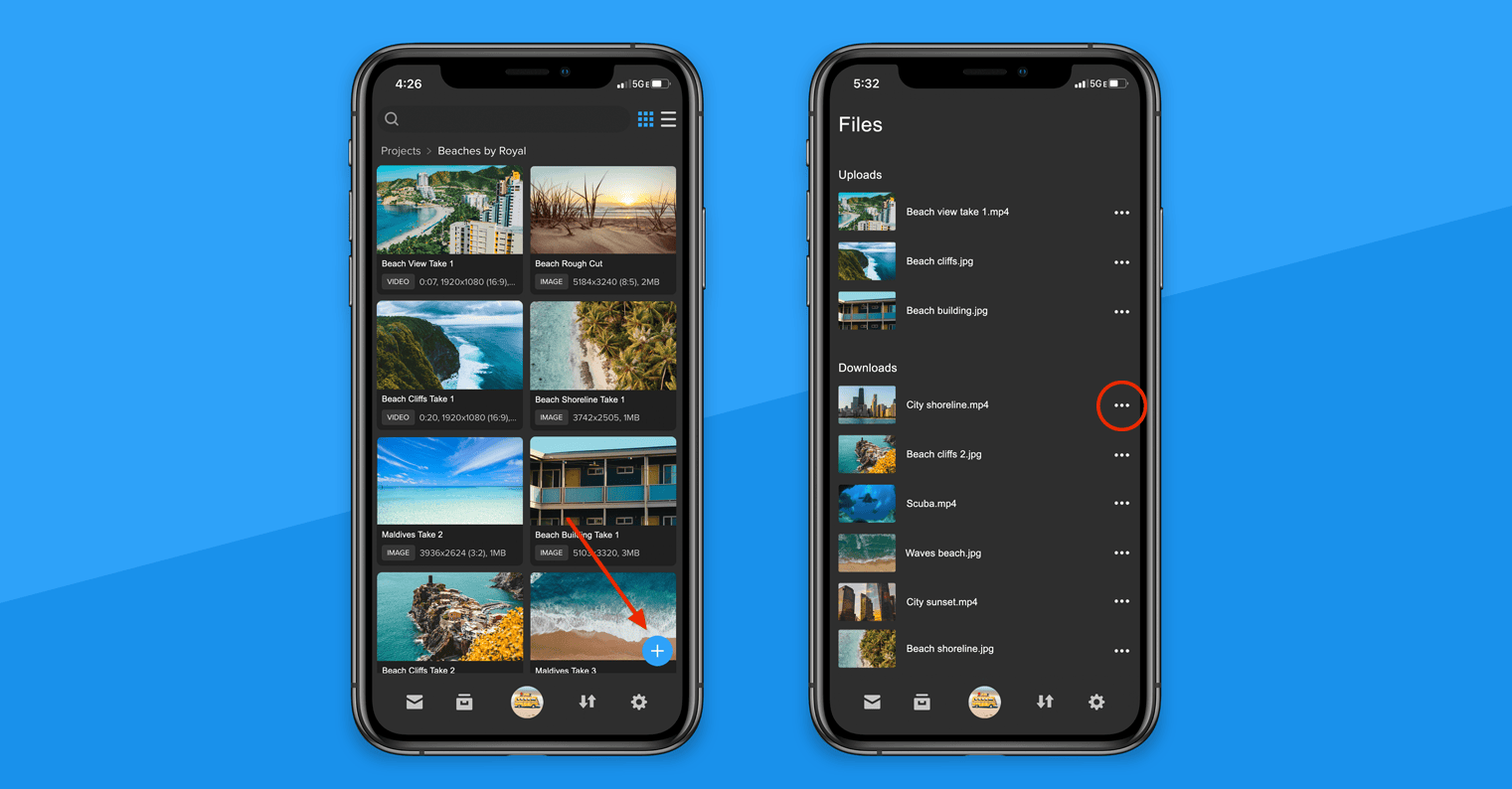
With the SHIFT GO app for iOS and Android, you can now create folders and upload files directly from your phone. To start uploading, simply tap the plus button in the bottom-right corner of your project screen. In addition to downloading files for offline viewing, you can now save files straight to your phone to use them with other mobile apps. On the Files page, find the file you need to download, tap the action menu next to it, and choose “Save to Device.” Note: You can only save a file to your device if you have download permission on a project or a review link.
MediaSilo Product Update: Upload and download files on SHIFT GO
EditShare Team ·
More from the blog
View all
Blog September 22, 2026
IBC 2026: Technology is moving fast. Workflows need to get simpler

Blog August 13, 2026
MediaSilo AI: Less Time Transcribing, Searching and Moving Media

Blog August 5, 2026
7 Signs Your Production Handoff Is Losing Footage

Blog July 21, 2026
Finding Footage Faster: How FLOW AI Brings Analytical Intelligence to Your Media Workflow

Blog June 25, 2026
How Sports Media Teams Can Make Every Clip Searchable

Blog June 10, 2026
Why Security Must Be Built Into Every Media Workflow
Let us tailor a solution for your needs
Our pre-sales and professional services organizations can help you scope the optimal solution for your project.